Get help and give feedback
Latte is still growing, and the fastest way to get help — or to shape what comes next — is the Latte community on Discord: discord.latte.study. You can open it straight from that link, or reach it from inside the app.
This is the community and support server, where you share feedback and report bugs. It's separate from signing in — you sign in to Latte with Google, not Discord.
The Discord link above works without a Latte account, so it's the one to use when you're locked out. For a privacy request specifically — your data, or deleting your account — email privacy@cafe-vanille.com; see Privacy & legal.
- 🖥 Web
- 📱 Mobile
-
Open the menu from the icon in the top bar.
-
Click Request a feature! to suggest an improvement, or Report a bug! to flag something broken. Both open the Latte community on Discord in a new tab.
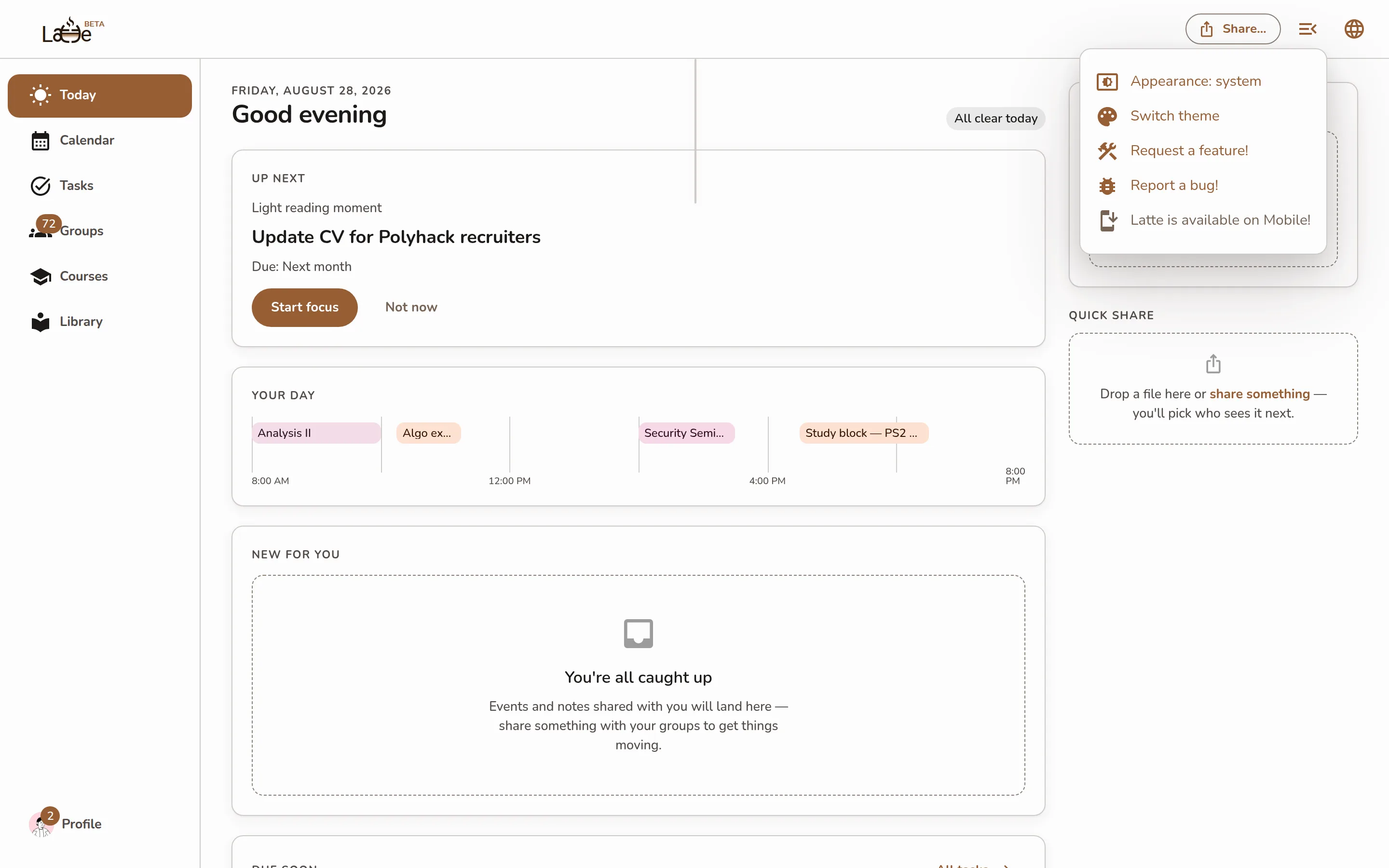
The top-bar menu open, showing the Request a feature! and Report a bug! items
-
Open the more-actions menu from the icon in the top bar.
-
Tap Ask Support. Latte opens the community Discord where you can ask a question, report a bug, or suggest a feature.
Screenshot coming soonThe mobile more-actions menu open, showing the Ask Support item
It helps to skim Troubleshooting first — a stale view or a web-only feature is often a quick fix rather than a bug.