Sign in to Latte
Latte signs you in with your Google account, on the web and on the phone alike. If you'd rather look around first, you can explore a demo with no sign-in at all.
Sign-in with Microsoft and with Apple is built and will appear as extra buttons on this same screen once it is switched on. Until then Google is the one student sign-in, and there is nothing you need to do to prepare — see Microsoft and Apple sign-in below.
If you're setting Latte up for a school rather than for yourself, you sign in somewhere else and with a different account — see Signing in as a school administrator at the end of this page.
You'll need Latte open on the sign-in screen — see Install and open Latte.
- 🖥 Web
- 📱 Mobile
-
On the sign-in screen, click Continue with Google.
Screenshot coming soonThe web login card with the Continue with Google button, the school-email tip, the outlined Try a demo button, and the quiet school-administrator entry link below the legal row -
In the Google window that opens, choose the account you want to use and approve access.
-
Latte signs you in and takes you into the app. If you're new, it sets up your account and opens Let's put your week in one place — connect a source, capture one thing, or Skip for now. Every route ends on Today. See Your first five minutes.
To explore without an account instead, click Try a demo below the sign-in options — see Try the demo.
Use your school's Google account if you have one — it makes it easy to verify your school email and find your classmates.
The desktop app signs in exactly the same way.
-
Open Latte. It offers Google sign-in automatically — pick your Google account and approve access.
-
Latte signs you in and opens the Today tab.
To explore without an account instead, tap Try a demo at the bottom of the screen.
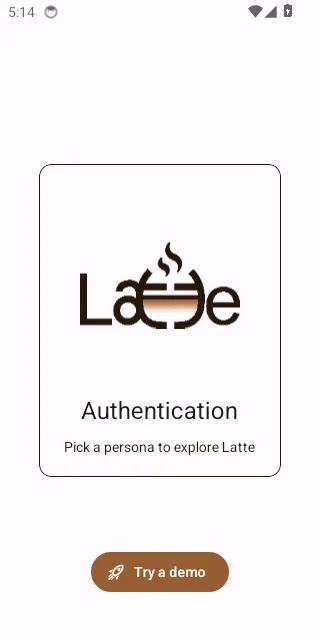
The mobile sign-in screen with the Try a demo button highlighted at the bottom
Which account should I use?
- Your school's Google account, if you have one. It makes verifying your school email trivial and puts you in the right place to find classmates.
- Your personal Google account otherwise. Nothing in Latte requires a school account; you can add and verify a school email later from your profile.
- If your school gives you a Microsoft account — the kind you use for Teams, Outlook or OneDrive — that is the one to use once Microsoft sign-in is switched on. Until then, sign in with Google and add your school email on your profile; you will not lose anything when the Microsoft button appears.
You can only sign in with one provider per account, so pick the address you expect to still have next year.
Microsoft and Apple sign-in
Both are written, tested and shipped in the app — they are simply not switched on for students yet, so you will not see their buttons on the sign-in screen today. When they are enabled, they appear as extra buttons beneath Continue with Google, on the web and on the phone. On an iPhone, Apple sign-in uses the system sheet rather than a browser window.
There is nothing to sign up for in the meantime, and no separate announcement to watch.
A Continue with Microsoft button already exists on the separate school-administrator card — that is for staff who manage a school's licence, and it is a different account and a different screen. See Signing in as a school administrator below.
What Latte reads from your account
Whichever provider you use, Latte asks for the smallest thing that works: your email address and your name, plus the provider's own identifier for you. That is what fills in your profile and lets Latte recognise you the next time.
What Latte does not ask for, from any of the three:
- Your mailbox. Not Gmail, not Outlook mail. Latte cannot read, send or search your mail.
- Your organisation's directory. Latte cannot list your colleagues, classmates or groups from a school's Microsoft tenant.
- Your files. Not Drive, not OneDrive, not iCloud.
- Your calendar — unless you ask. Signing in with Google does not connect your Google Calendar. That is a separate step you take yourself, with its own permission prompt, and you can undo it — see Google Calendar sync.
Apple lets you hide your real address behind a relay address at sign-in. Latte works either way; just remember which one you chose, because it is the address your account is tied to.
The one-time confirmation
The first time you sign in — on the phone as well as on the web — Latte shows a short card, Welcome to Latte: "Latte is made for adults. Just one quick confirmation before you start." Tick I confirm I am 18 years of age or older and I have read and agree to the Terms of Service and the Privacy Policy, then tap Continue.
On the phone the card carries one more line — Share anonymous usage data to help improve Latte — which is optional and starts switched off. Ticking it is entirely up to you; Continue works either way, and you can change your mind later under Profile → Other. See Privacy & legal.
You'll see it again only if the terms change. Demo sessions skip it — see Try the demo.
If the Google window closes without signing you in
Two different things can look identical here, so Latte tells them apart:
- You closed the window yourself. Nothing happens and no error appears — just click Continue with Google again when you're ready.
- Google refused the request. Latte shows "Sign-in with Google is unavailable right now" and explains that the problem is on our side, not yours. There is nothing to fix on your account — try again later, and use a demo in the meantime if you just want to look around.
If the button is greyed out entirely, Google sign-in is misconfigured for that installation and an administrator needs to correct it.
Signing in as a school administrator
Latte has a second, separate sign-in for the staff who manage a school's licence — not for
students. It's reached from the quiet Are you a school administrator? link at the bottom of the
web sign-in card, which opens the School Admin Portal at /school-admin.
That card accepts your school's Microsoft work account (Continue with Microsoft), or the Google account that was registered with Latte as an administrator. It is web-only: there is no administrator sign-in in the mobile app.
If you landed there by accident, Not an administrator? Go to student sign-in takes you back.
Signing in there doesn't give you a student account, and a student account can't open it. If you're a student whose school has a Latte licence, you just sign in with Google as above — see Latte through your school.