Add and verify your school email
Verifying a school email links your account to your institution, so you can see and join your school's groups. Latte only uses it to confirm your affiliation.
Have your school email address handy — you'll need to open your inbox for a verification code.
- 🖥 Web
- 📱 Mobile
-
Click Profile in the navigation to open your profile page.
-
In the Preferences panel, find Verified emails and click Add a school email.
Screenshot coming soonThe Verified emails list in the Preferences panel with the Add a school email button -
In the Verify a school email dialog, enter your school email address. Latte shows the school it recognizes. Click Confirm.
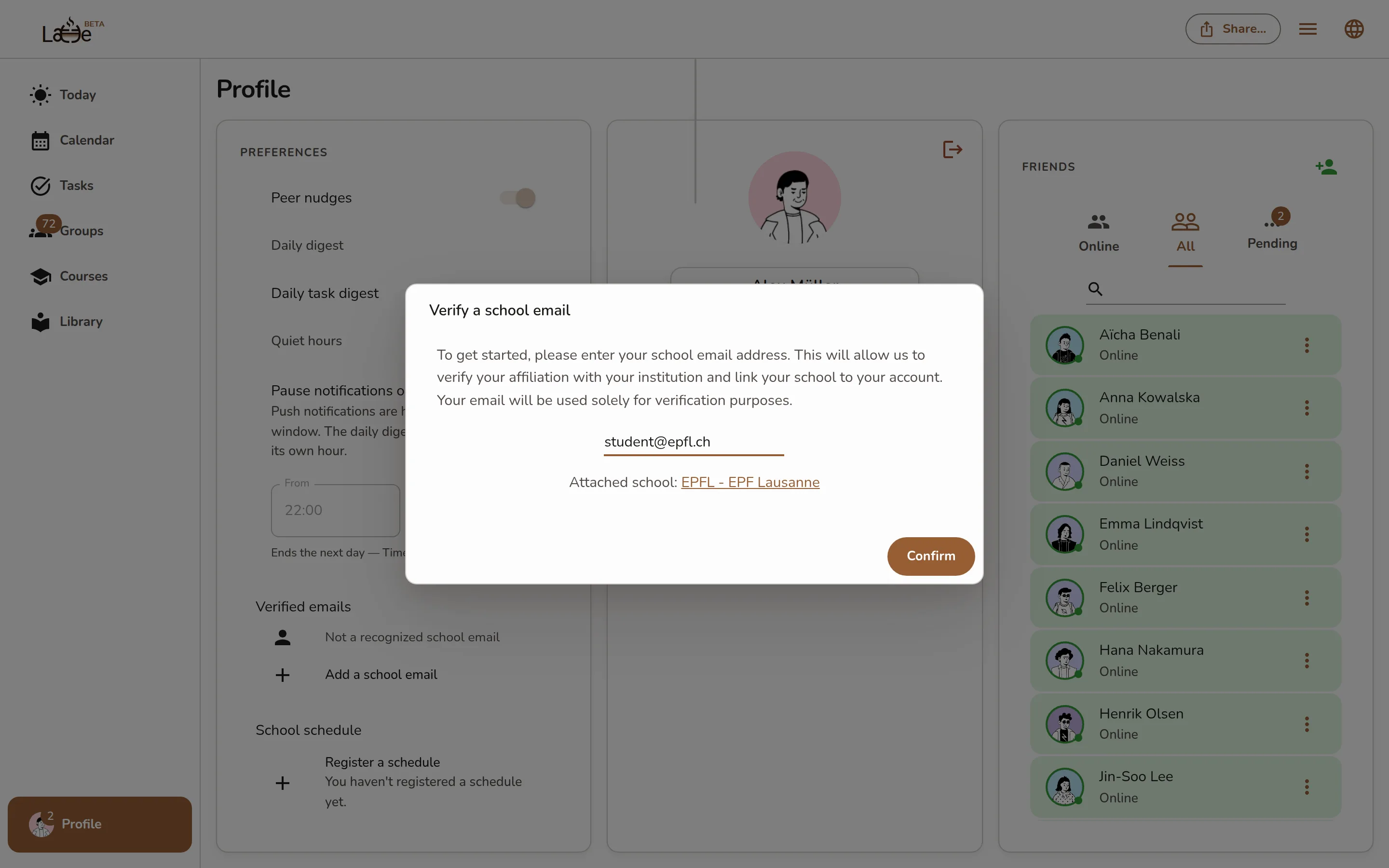
The Verify a school email dialog with the email field and the recognized school -
Check your inbox for the verification code, type it in, and Latte confirms the email is verified.
-
Open your profile.
-
Under Verified emails, tap Add a school email.
-
On the email screen, enter your school email address and tap Confirm.
Screenshot coming soonThe mobile add-school-email screen with the email field and Confirm button -
Enter the verification code from your inbox to finish linking your school.
If the code doesn't arrive, check your spam folder or request a new one. You can verify more than one school email — each verified address appears in your Verified emails list.