Today on the web
Today is the page Latte opens to on the web — a single calm column that answers "what should I do now?". It greets you (Good morning, Good afternoon, or Good evening) with how many tasks you have today, then lays the day out top to bottom. The old three-panel Home dashboard is retired; its old address redirects here.
-
Sign in on the web. Latte opens straight to Today — it's also the first entry in the navigation rail on the left.
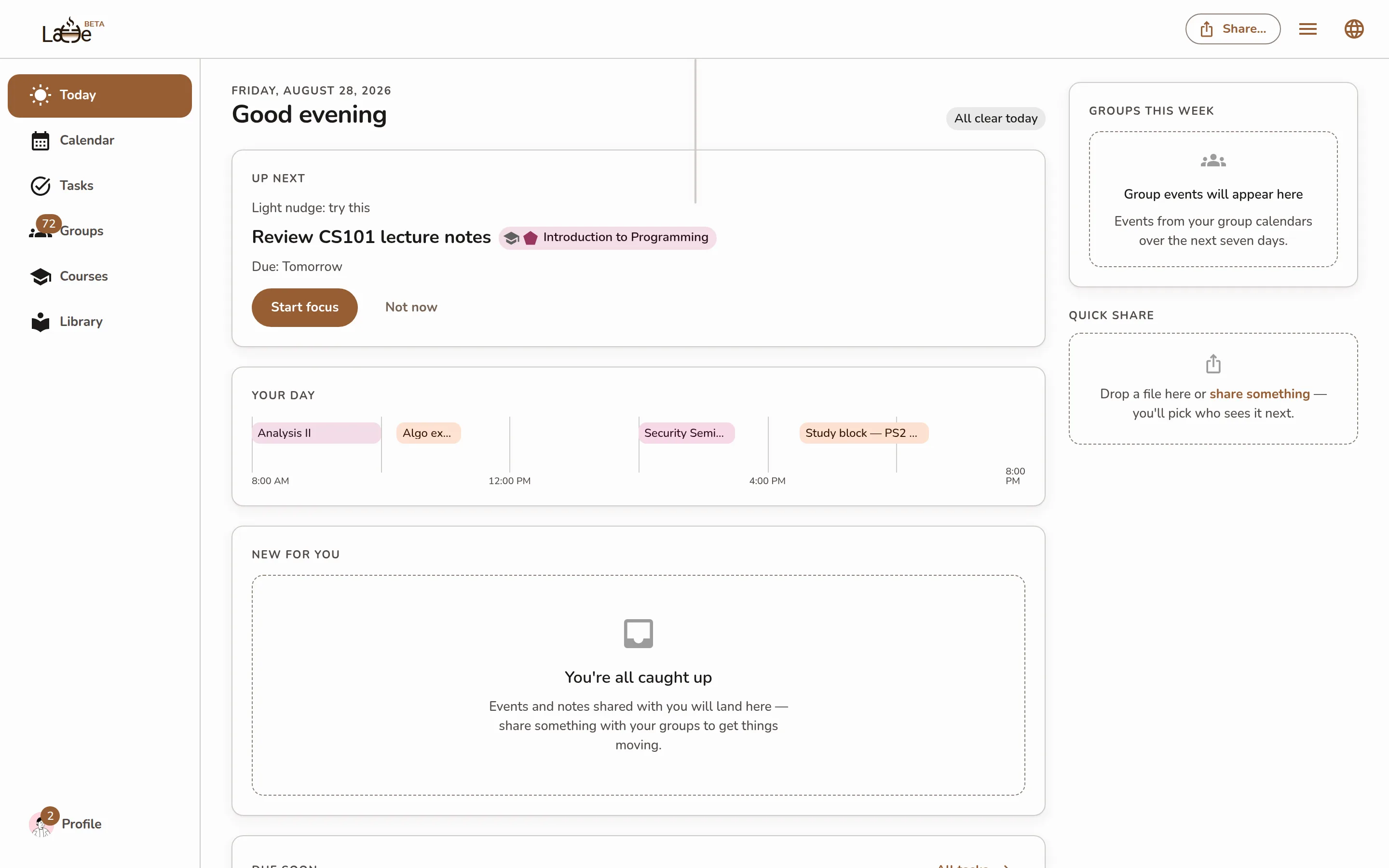
The Today page: greeting header with the day's task count, the Up next card, the Your day strip, and the New for you / Due soon / Groups this week cards below -
Up next is the task Latte suggests you start now, with a short encouraging line, its course chip, and its due date. Click Start focus to open a focus session on it, or Not now to see the next suggestion.
-
Directly beneath it, a second card carries the two tasks that come after — three in total, never more. See Your next three.
-
What moved since yesterday lists the dated things your sources changed — moved, renamed, added or removed — with the before and after where Latte has both. See What moved since yesterday.
-
Your day is a compact strip of today's events in order, with a Now marker showing where you are in the day. A free day reads A clear day.
-
New for you collects what classmates shared with your groups since you last looked — shared events and shared notes together. On a shared event, click Add to calendar to pull it into your own calendar or Dismiss to wave it off; on a shared note, Open takes you to it in the Library. Events that changed since you added them carry an Updated chip. When there's nothing new, the card says You're all caught up.
Screenshot coming soonThe New for you card with a shared event (Add to calendar / Dismiss) and a shared note (Open), one carrying the Updated chip -
Due soon lists your next few open tasks (at most five) with a check circle to complete them, an Add a task field to capture a new one without leaving the page, and an All tasks link to the full task list.
-
Groups this week shows the events from your group calendars over the next seven days, so you know what your groups are doing without opening each one.
If you have no groups yet, an invitation to find or start one sits near the bottom of the column. It is a card you can dismiss, not a step you have to complete — see Your first five minutes.
The desktop app opens to the same Today page, laid out identically.
The mobile app has its own Today tab — same idea, phone-shaped: the recommendation card on top and the day's schedule under it.